This guide walks you through every step of moving from SuperHote to Nowistay as your channel manager and property management system. Plan about 20 minutes per property, plus the time to export your data from SuperHote.
Airbnb accepts only one channel manager per account, and Booking.com, Vrbo and Expedia only one per property, so each channel has to move from SuperHote to Nowistay. The fastest and most reliable way does not depend on SuperHote at all: you remove SuperHote’s access from your Airbnb account and you switch the connectivity provider in your Booking.com extranet. No support ticket, no waiting. The SuperHote-specific instructions below cover everything else: what to export, where your message templates and booking website live, and how to cancel your subscription.
SuperHote’s interface is in French, so this guide gives its labels in French with an English translation. It covers SuperHote V2, the current version, and mentions the V1 steps where they differ.
Moving from a different tool? Read the general guide: How to migrate from your PMS (channel manager) to Nowistay.
Remove the old Airbnb connection and connect Nowistay in one sitting, ideally at a quiet time of the day: in between, nobody updates your Airbnb calendar.
SuperHote does not transfer your data to another tool, and some of it disappears when you disconnect a channel or when the subscription ends. Save it first:
SuperHote warns that bookings and invoices are no longer accessible once the account is deleted.
Also have these ready:
Details: What changes when you connect Nowistay as your channel manager.
This cuts the connection from Airbnb’s side. It works whatever the state of your SuperHote account, and it disconnects all your listings in one go.
Airbnb disconnects every listing that was linked to SuperHote at once. Older Airbnb pages call this section Privacy & sharing and Services: it is the same place.
If SuperHote appears more than once in the list (for example after the move from V1 to V2), remove every entry.
Prefer to start from SuperHote? SuperHote’s own instructions for leaving are to remove it from Airbnb’s connected services, as in 1a. On V1, a single listing is unsynchronized in Hébergement > Éditer > Plateformes > AirBnB > Appartements > Actions > Enregistrer.
After a channel manager is disconnected, Airbnb may put some settings back to their default values (minimum stay, maximum stay, closed to arrival or departure). You will check them in Step 6.
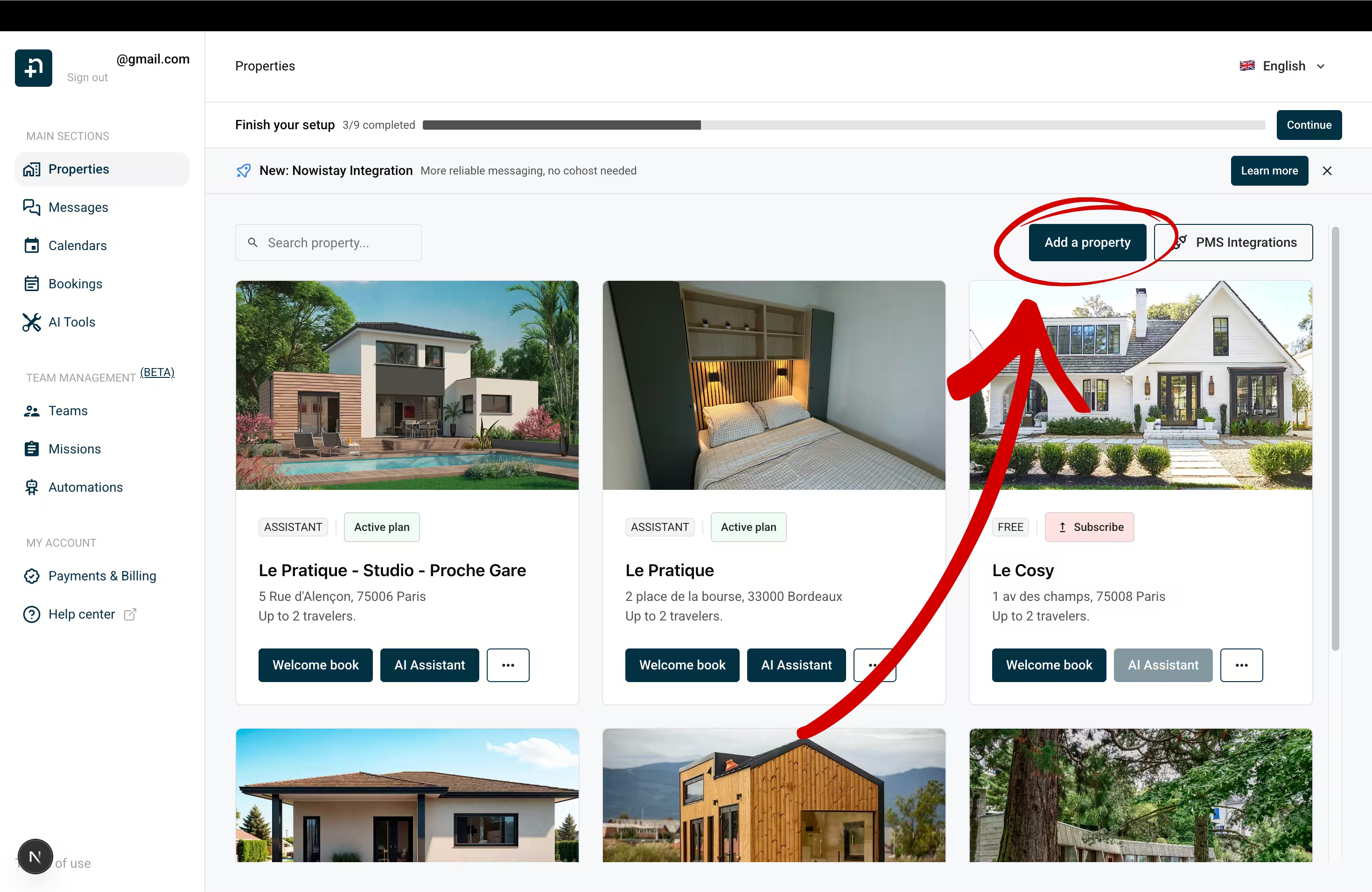
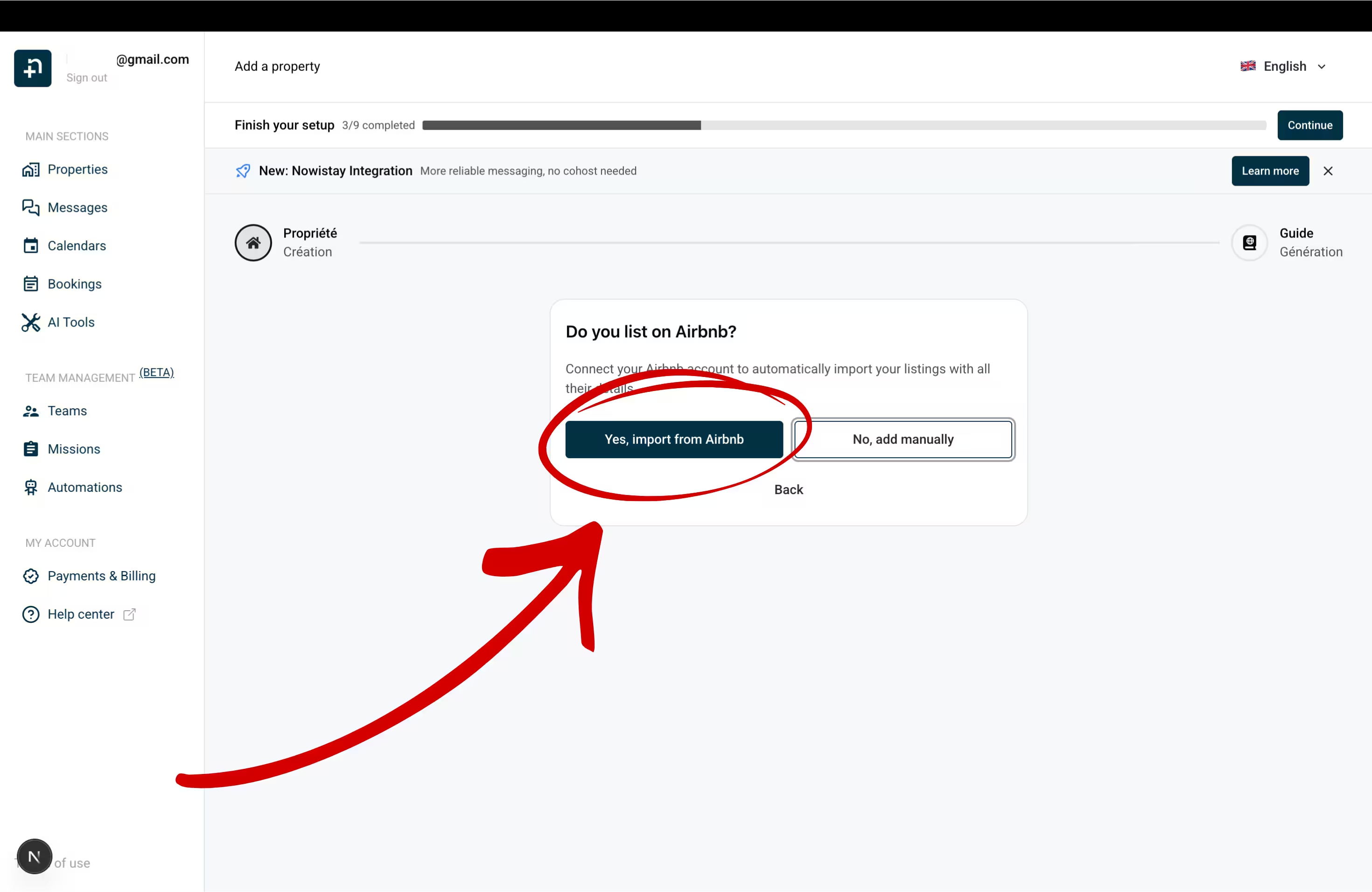
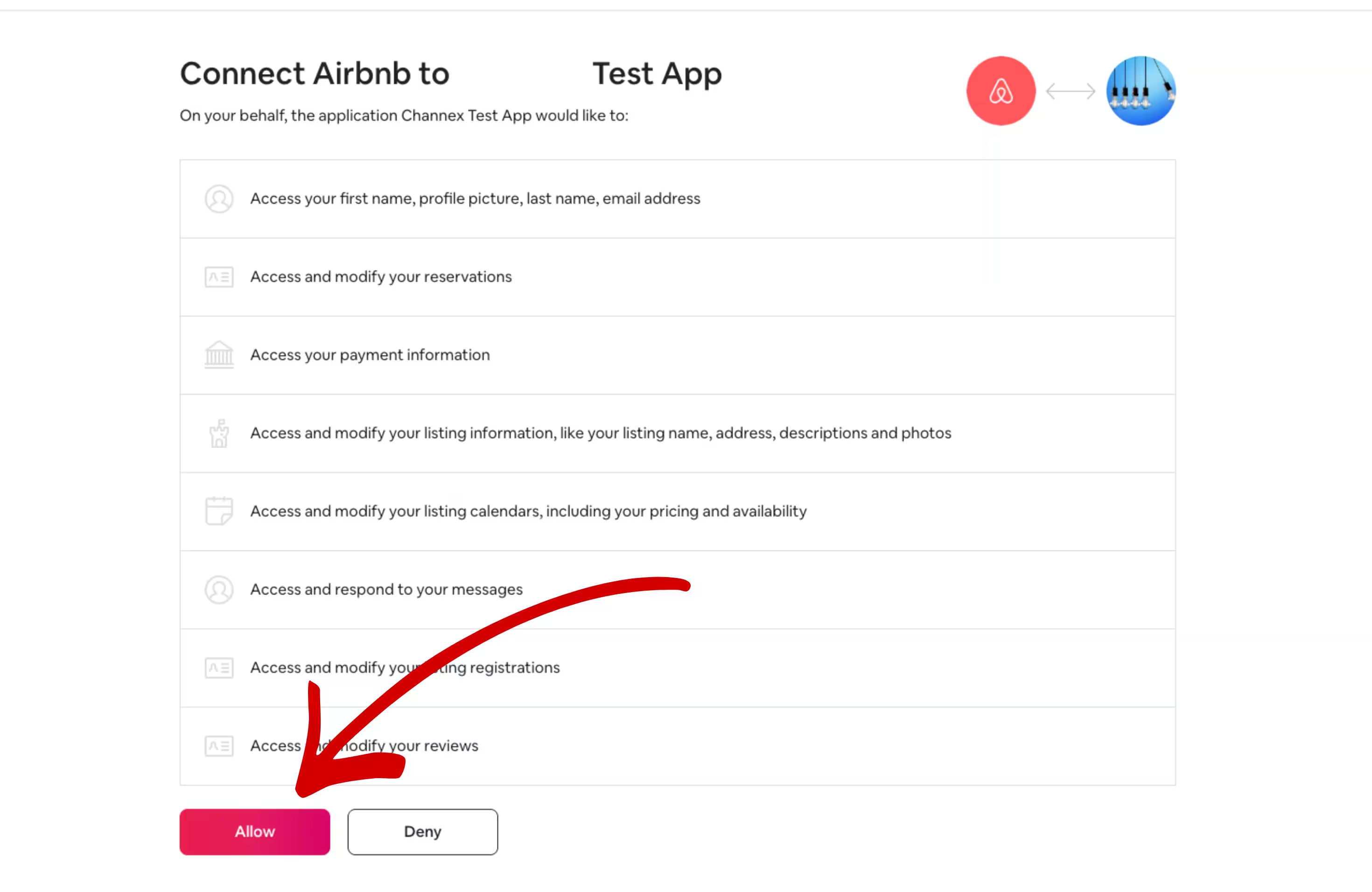
Each property is created with its Airbnb data: name, photos, description, prices and availability. Detailed walkthrough: Connect Airbnb to Nowistay.
Booking.com lets you go straight from SuperHote to the new provider. Your property stays connected to SuperHote until the switch is complete, so it never goes unmanaged.
SuperHote V1: do not use Déconnecter (Disconnect) in SuperHote’s Booking.com settings first: it deletes all Booking.com reservations from the SuperHote calendar.

Repeat this for each Booking.com property, even if you already did it for another one.
If Booking.com is the first channel of this property, Nowistay first asks for a Default night rate. Detailed walkthrough: Connect Booking.com to Nowistay.
Then, in SuperHote V2, go to Hébergement (Property) > your property > Plateforme (Platform), click the Booking.com logo, then Désynchroniser (Unsync) at the bottom of the panel. Choose Conserver les réservations futures (Keep future bookings) rather than Tout supprimer (Delete everything): the choice is irreversible. Confirm with Désynchroniser.
Links in messages: Booking.com only lets guests open links that you have allowed in the extranet. If your welcome guide link is not clickable, see Welcome guide links not clickable on Booking.com.
SuperHote V2 syncs Abritel/Vrbo by calendar (iCal). In Abritel, go to Calendrier (Calendar) > settings > Disponibilité (Availability) > Synchroniser les calendriers (Sync calendars) and delete the calendar import named SuperHote, then remove the Abritel calendar link in SuperHote. If you used SuperHote’s full Vrbo connection, contact Abritel/Vrbo support to disconnect SuperHote: with that connection, your listing content and guest payments went through SuperHote, so make sure they are back under your control on Abritel.
Then connect Vrbo in Nowistay: Synchronization > Add a booking platform (OTA) > Vrbo, enter your Vrbo username or email and Vrbo password, click Next, choose the phone number for the SMS code, click Request verification code, enter the code and click Verify code, then select your listing and click Connect. Vrbo does not share bookings made before the connection: add them with the CSV import (Step 5). Guest messaging is not available through Vrbo, so reach Vrbo guests by email or WhatsApp. Detailed walkthrough: How to connect your Vrbo listing.
SuperHote does not manage Expedia. If you list on Expedia, connect it to Nowistay directly.
To switch Expedia to Nowistay: in Expedia Partner Central, select the property, go to Rooms and Rates > Connectivity Settings, click Change Provider, search for Channex, click Next, then confirm with Change provider. Make sure Channex manages both rates and availability and booking retrieval. If Connectivity Settings is missing, open a ticket with Expedia of type Room, Rates and Availability. Then, in Nowistay: Synchronization > Add a booking platform (OTA) > Expedia, enter your Expedia Hotel ID, choose the Minimum stay rule (Arrival or Through), select the room type and click Connect.
Upcoming Airbnb and Booking.com reservations arrive in Nowistay by themselves when you connect those channels. What does not come back on its own: direct bookings and bookings taken by phone or email in SuperHote, Vrbo bookings made before the connection, and owner stays. Import them from a CSV file so your calendar is complete and no one can book those nights again.
Good to know: imported bookings are added as direct bookings and block the nights on all your channels. Duplicates (same reservation number, or same dates and same guest) and upcoming stays that overlap a booking you already have are skipped, so re-importing the same file is safe. Guests do not receive a booking confirmation, but your check-in and check-out messages are scheduled for their upcoming stays. A wrong import can be undone from Import history > Delete & revert. Full guide: Import bookings from a CSV file.
Right after connecting your channels, check that prices and availability are right. Some values may have been reset when SuperHote was disconnected.
Markup on Airbnb prices: when you connect Airbnb, Nowistay copies your current Airbnb prices into its calendar. SuperHote recommends a price multiplier of about 20 to 23% on Airbnb to offset Airbnb’s fee, applied on top of PriceLabs prices too: check yours. If your Airbnb prices included a markup, those marked-up prices became your base prices and would also be sent to your other channels: lower your base prices in the calendar, then add the markup back for Airbnb only with the Rate Adjustment setting (below).
Guide: How to manage availability and prices from the calendar.
On the Properties page, click … then Property infos, and check Default night rate, Earliest arrival time (check-in), Latest departure time (check-out), the default minimum and maximum number of nights and the Cut-off time. Click Save.
In Synchronization, click the gear icon (Channel settings) on your Airbnb connection:
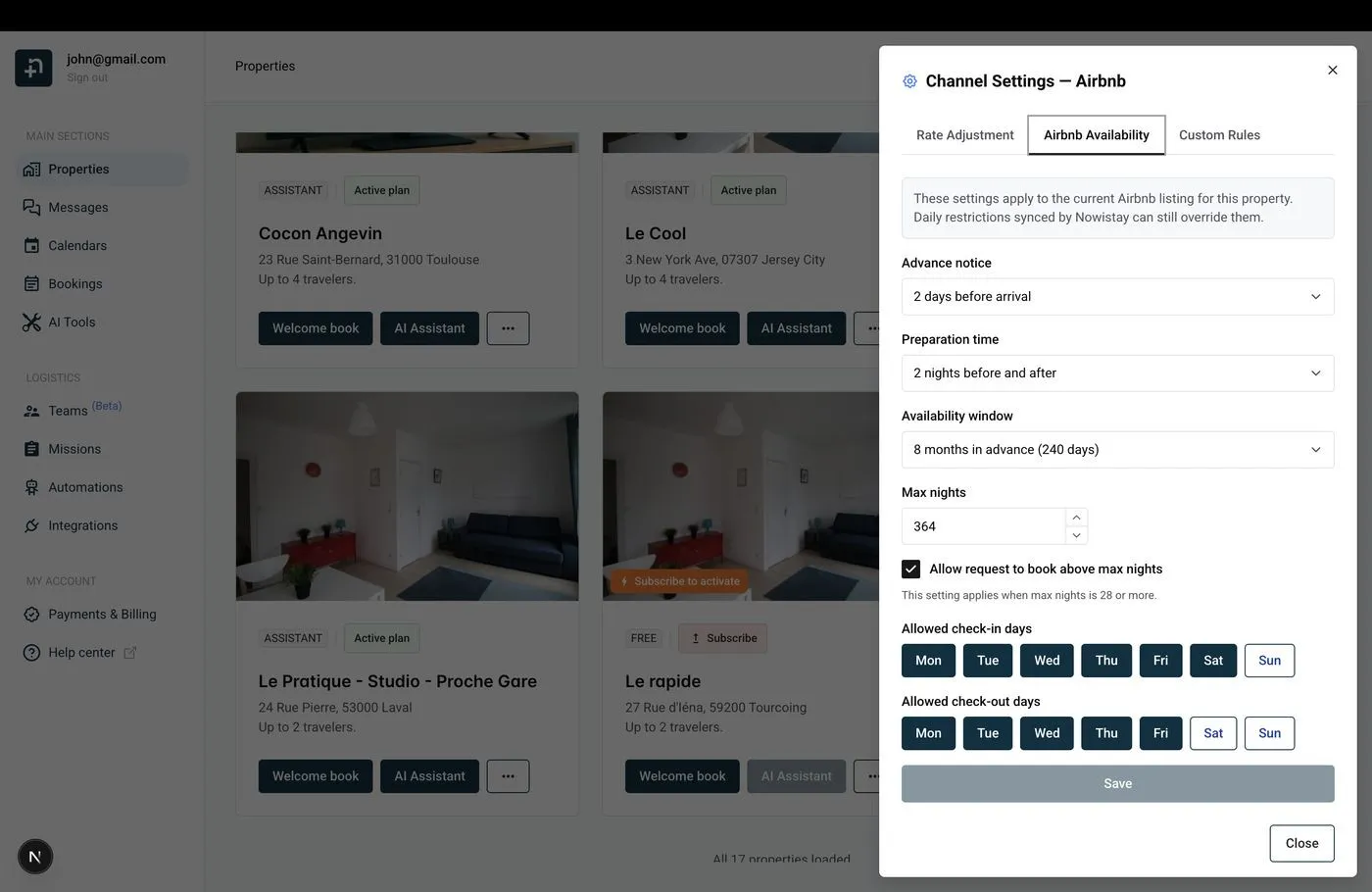
Guide: Airbnb availability settings.
Nowistay then helps you create your welcome guide, the digital guest handbook the AI co-host uses to answer questions. Let the AI generate it from your Airbnb listing and your PDF documents, copy a guide from another property, or start from scratch. Paste in what you used to send from SuperHote: arrival instructions, Wi-Fi, house rules, parking, local tips. Your AI co-host then answers guests on Airbnb, Booking.com, Expedia, WhatsApp and email, 24/7, from the first inquiry. Guide: Create your digital welcome guide with AI.
In SuperHote V2, your messages are in Messages automatiques (Automated messages), your reusable texts are the Modèles (Templates) of the Messagerie (Inbox), and your custom fields are under Shortcodes > Personnalisés (Custom). On V1, everything was under Notifications. Nothing can be exported: copy each message with its trigger and delay.
Nowistay sends each message in the guest’s language: add languages to a template and use Translate from default to translate it with AI.
SuperHote V2 uses double braces like Nowistay (some names are even identical), V1 used square brackets.
{{guest_first_name}} (V1 [GUEST:FIRST_NAME]) → {{guest_first_name}}{{guest_last_name}} → {{guest_last_name}}[GUEST:NAME] (V1) → {{guest_full_name}}[INQUIRY:ADULTS] (V1) → {{guest_count}}[INQUIRY:CHILDREN] (V1) → {{number_of_children}}{{checkin_date}} (V1 [BOOKING:CHECKING]) → {{arrival_date}}{{checkout_date}} (V1 [BOOKING:CHECKOUT]) → {{departure_date}}[RENTAL:ARRIVAL_TIME] (V1) → {{check_in_time}}[RENTAL:DEPARTURE_TIME] (V1) → {{check_out_time}}{{nights_count}} (V1 [INQUIRY:NIGHTS]) → {{number_of_nights}}{{rental_name}} (V1 [RENTAL:NAME]) → {{property_name}}{{rental_address}} (V1 [RENTAL:ADDRESS]) → {{property_address}}[BOOKING:CONFIRMATION-CODE] (V1) → {{reservation_number}}{{total_price}} (V1 [INQUIRY:COST]) → {{booking_amount}}{{lock_code}} (V1 [RENTALDOOR:CODE]) → {{smartlock_code}}{{guest_page_link}} (V1 [WELCOME_FORM_URL]) → {{welcome_guide_url}}Nowistay also offers {{arrival_day_name}}, {{days_to_checkin}}, {{host_first_name}}, {{whatsapp_link}}, {{identity_check_link}} (guest identity verification) and {{deposit_payment_link}} (security deposit). Wi-Fi codes, parking details and other fixed property information belong in your welcome guide, or in property variables you can insert from the variable picker.
Example: to send a message at 10:00 two days before arrival with a 16:00 check-in, choose Check-in, Before the event, 54 hours.
Then deactivate your messages in SuperHote so guests don’t receive them twice. For deposits and identity checks, Nowistay uses the {{deposit_payment_link}} and {{identity_check_link}} variables.
Guide: How to set up automated guest messages.
If PriceLabs was connected to SuperHote (Hébergements > your property > Tarification, or Plateformes & Intégrations > Applications tierces > PriceLabs), reconnect your listings in PriceLabs through Nowistay as below. SuperHote applied its price multiplier on top of the PriceLabs prices: recreate it with the Airbnb Rate Adjustment (Step 6).
To connect PriceLabs to Nowistay: go to Integrations, open the Pricelabs card, click Configure then Generate Key and copy the key. In PriceLabs, click Add Your Listings, select Channex, paste the key and click Connect. A property appears once it is on Nowistay PMS with at least one connected channel. Your PriceLabs strategies keep working, only the connection changes. Guide: How to connect PriceLabs for dynamic pricing.
In Nowistay, go to Integrations > Smart locks and click Connect on your brand: Nuki, igloohome, Tedee, TTLock, Homeit, and the Premium connection for Schlage, Yale, August and KeyNest. Nowistay creates a code for each booking, valid from check-in to check-out, and sends it with the {{smartlock_code}} variable.
SuperHote works with TTLock, Nuki and igloohome, all supported by Nowistay. Remove the lock from your properties in SuperHote so only Nowistay sends codes.
SuperHote’s Site de réservation (booking site), its booking engine and the Guest Page stop with your account, along with payment links, deposits and contracts. On your own website, remove the SuperHote engine: the SuperHote V2 WordPress plugin and its shortcodes ([superhote_rentals], [superhote_search], [superhote_form_search], [superhote_search_map]), or the V1 iframe pointing to app.superhote.com. If SuperHote built your WordPress site, it belongs to you: SuperHote provides the admin access and a backup procedure so you can move the hosting.
To take direct bookings with Nowistay: go to Integrations > Direct Booking > Configure, connect your Stripe account (Connect Stripe Account), click Create widget (Single property or Multiple properties), then copy the Embed code and paste it where the old widget was. In the widget settings, choose Full payment or Split payment, and add your taxes and discounts. The widget works on WordPress, Webflow, Wix, Squarespace or plain HTML. Guide: How to set up direct booking on your website.
Do this last, once Airbnb, Booking.com, Vrbo and Expedia all show as connected in Nowistay and your direct bookings are imported. Disconnecting channels does not stop SuperHote billing: you have to cancel.
SuperHote has no cancel button in the app: Paramètres > Abonnement (Settings > Subscription) only shows your plan and renewal date. According to its terms, the subscription renews automatically and is cancelled by email to SuperHote support at least 24 hours before the end of the period.
To delete the account, fill in SuperHote’s SUPPRESSION DE COMPTE (account deletion) form, submit it with Demander la suppression de mon compte (Request the deletion of my account), and disconnect your platforms. Deletion takes up to 5 business days and cannot be undone. SuperHote keeps billing even if you deactivate or delete properties, so cancel the subscription itself. The 30-day money-back guarantee counts from the purchase date, and annual plans are not refunded pro rata.
