This guide walks you through every step of moving from Smoobu to Nowistay as your channel manager and property management system. Plan about 20 minutes per property, plus the time to export your data from Smoobu.
Airbnb accepts only one channel manager per account, and Booking.com, Vrbo and Expedia only one per property, so each channel has to move from Smoobu to Nowistay. The fastest and most reliable way does not depend on Smoobu at all: you remove Smoobu’s access from your Airbnb account and you switch the connectivity provider in your Booking.com extranet. No support ticket, no waiting. The Smoobu-specific instructions below cover everything else: what to export, where your message templates and booking website live, and how to cancel your subscription.
Already using Nowistay with the Smoobu connection? Step 1 has a dedicated option: you keep your property, your welcome guide and your AI co-host settings.
Moving from a different tool? Read the general guide: How to migrate from your PMS (channel manager) to Nowistay.
Remove the old Airbnb connection and connect Nowistay in one sitting, ideally at a quiet time of the day: in between, nobody updates your Airbnb calendar.
Smoobu does not transfer your data to another tool, and some of it disappears when you disconnect a channel or when the subscription ends. Save it first:
Also have these ready:
Details: What changes when you connect Nowistay as your channel manager.
This cuts the connection from Airbnb’s side. It works whatever the state of your Smoobu account, and it disconnects all your listings in one go.
Airbnb disconnects every listing that was linked to Smoobu at once. Older Airbnb pages call this section Privacy & sharing and Services: it is the same place.
Prefer to start from Smoobu? In Smoobu, go to Channels, click the pencil icon on the Airbnb card, choose the account if you have several, then click Disconnect Accounts. Bookings already imported stay in Smoobu, only the sync stops.
After a channel manager is disconnected, Airbnb may put some settings back to their default values (minimum stay, maximum stay, closed to arrival or departure). You will check them in Step 6.
Option A: your property is already on Nowistay through the Smoobu connection. Keep it: only the synchronization method changes, and your welcome guide and AI co-host settings stay as they are.
Download your bookings first. Switching the method deletes the bookings that came from Smoobu, past and upcoming. Upcoming Airbnb and Booking.com reservations come back when you connect those channels, but direct bookings made in Smoobu do not. Go to Bookings, click the … button, then Download CSV: you will import them again in Step 5. Bookings created in Nowistay itself (manual bookings, direct booking widget) are kept.
If Nowistay asks Which calendar should we use?, choose Use the Airbnb calendar: your Airbnb calendar holds the prices Smoobu published.
Option B: you are new to Nowistay.
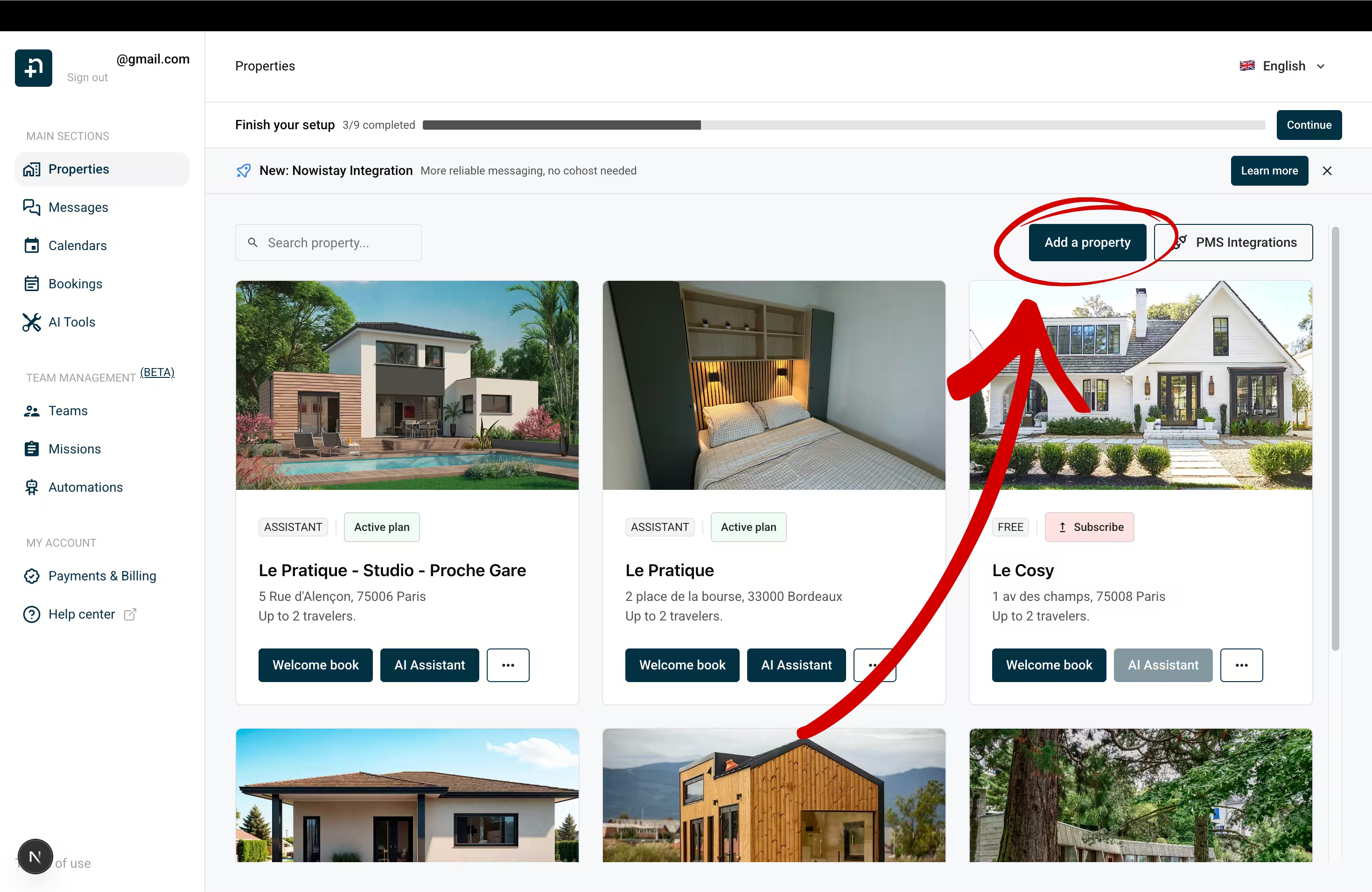
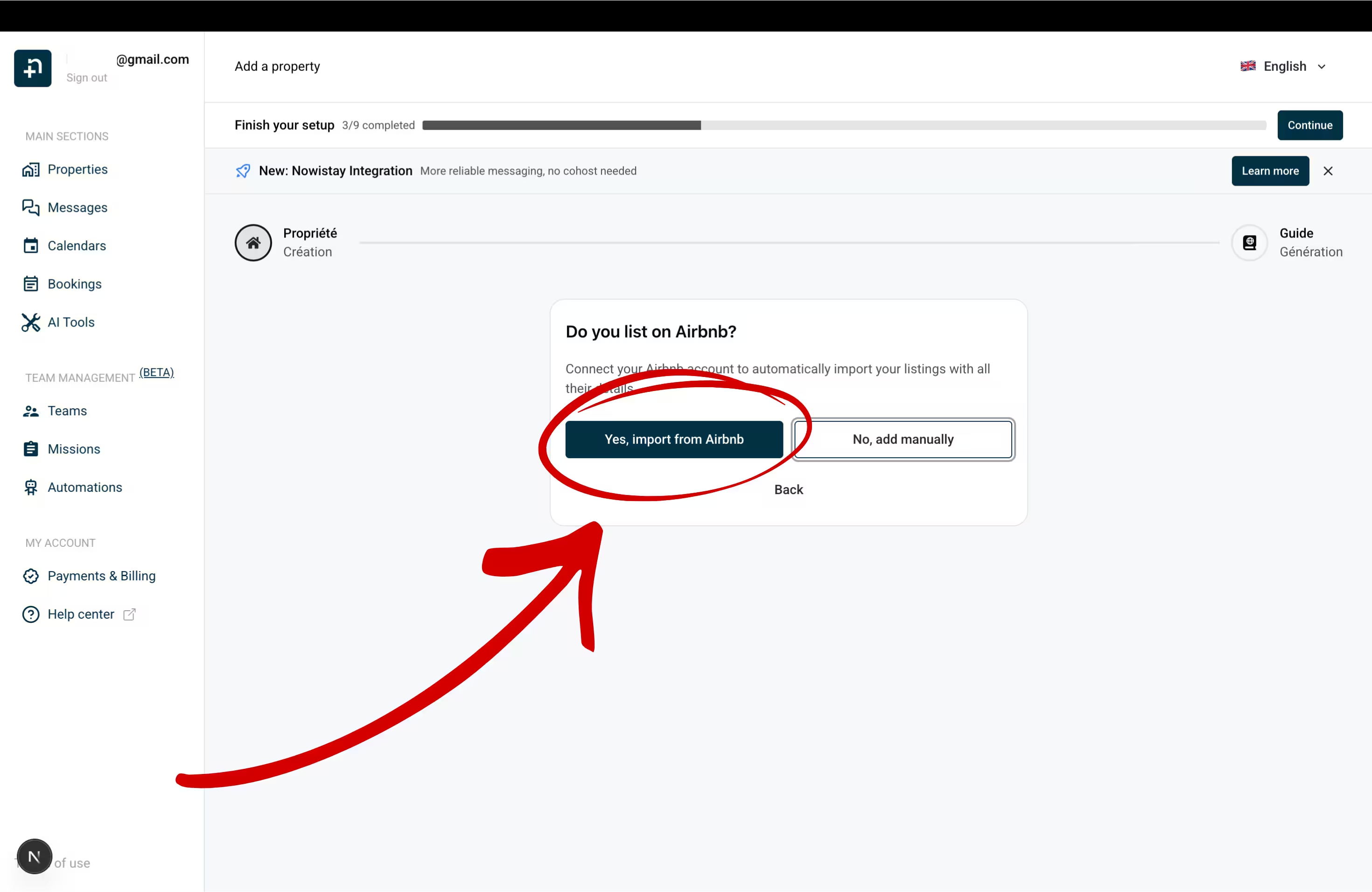
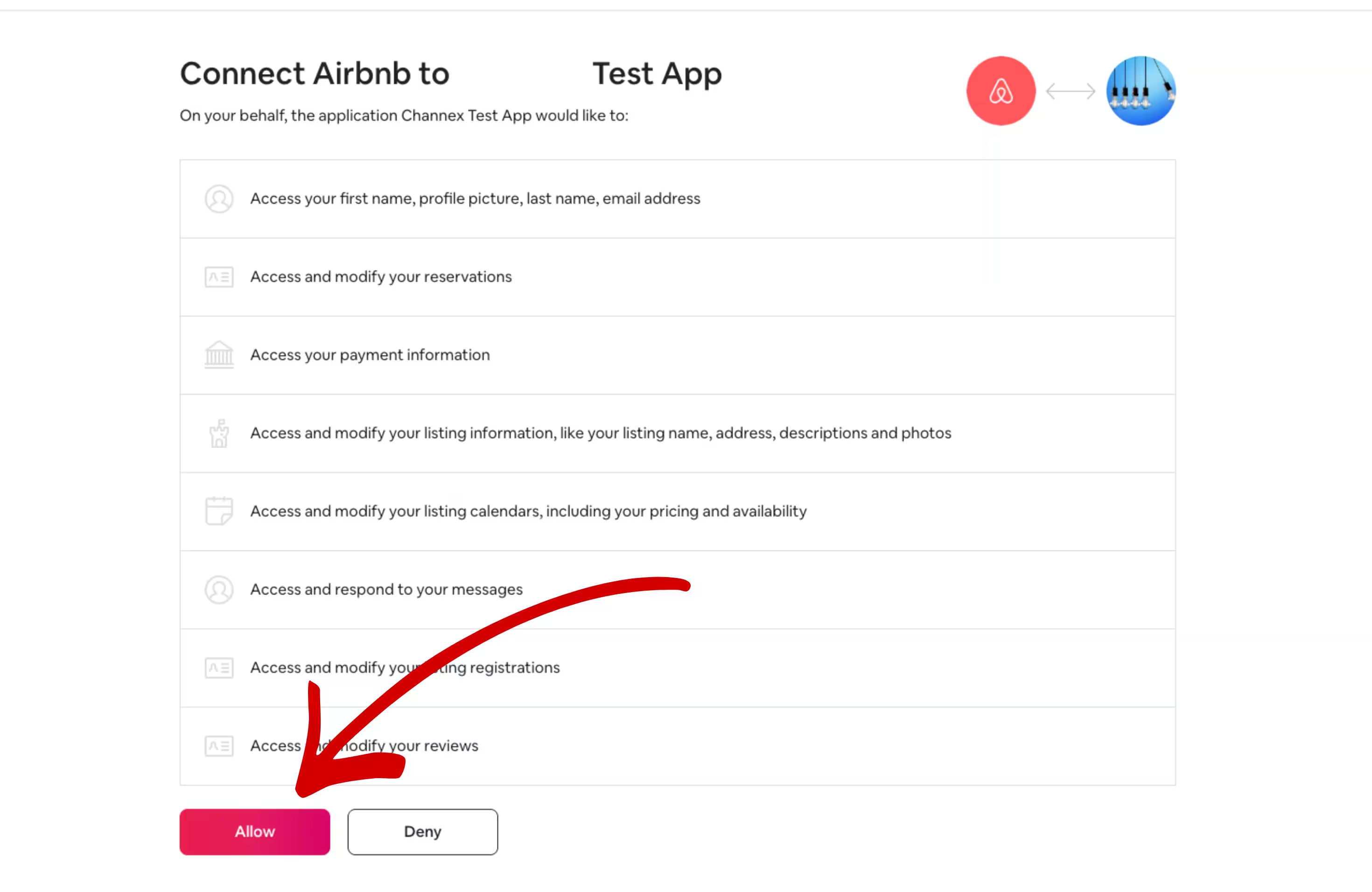
Each property is created with its Airbnb data: name, photos, description, prices and availability. Detailed walkthrough: Connect Airbnb to Nowistay.
Booking.com lets you go straight from Smoobu to the new provider. Your property stays connected to Smoobu until the switch is complete, so it never goes unmanaged.

Repeat this for each Booking.com property, even if you already did it for another one.
If Booking.com is the first channel of this property, Nowistay first asks for a Default night rate. Detailed walkthrough: Connect Booking.com to Nowistay.
Once Channex.io is active, remove the Booking.com link in Smoobu so it stops trying to sync: Channels > edit Booking.com, delete the Property ID and click Save.
Links in messages: Booking.com only lets guests open links that you have allowed in the extranet. If your welcome guide link is not clickable, see Welcome guide links not clickable on Booking.com.
Smoobu connects Vrbo through calendar (iCal) links only, so there is no channel manager to remove on Vrbo’s side. In Vrbo, go to Calendar > Availability > Import/Export calendar and delete the calendar imported from Smoobu, then remove the Vrbo calendar from Smoobu. Nowistay connects Vrbo through Vrbo’s official connection instead, with prices and availability, and it needs these old calendar imports to be gone.
Then connect Vrbo in Nowistay: Synchronization > Add a booking platform (OTA) > Vrbo, enter your Vrbo username or email and Vrbo password, click Next, choose the phone number for the SMS code, click Request verification code, enter the code and click Verify code, then select your listing and click Connect. Vrbo does not share bookings made before the connection: add them with the CSV import (Step 5). Guest messaging is not available through Vrbo, so reach Vrbo guests by email or WhatsApp. Detailed walkthrough: How to connect your Vrbo listing.
In Expedia Partner Central, Smoobu appears as your connectivity provider under the name Smoobu GmbH. Switch it to Nowistay as below, then check that your upcoming Expedia bookings appear in the Nowistay calendar and add any missing one with the CSV import (Step 5).
To switch Expedia to Nowistay: in Expedia Partner Central, select the property, go to Rooms and Rates > Connectivity Settings, click Change Provider, search for Channex, click Next, then confirm with Change provider. Make sure Channex manages both rates and availability and booking retrieval. If Connectivity Settings is missing, open a ticket with Expedia of type Room, Rates and Availability. Then, in Nowistay: Synchronization > Add a booking platform (OTA) > Expedia, enter your Expedia Hotel ID, choose the Minimum stay rule (Arrival or Through), select the room type and click Connect.
Upcoming Airbnb and Booking.com reservations arrive in Nowistay by themselves when you connect those channels. What does not come back on its own: direct bookings and bookings taken by phone or email in Smoobu, Vrbo bookings made before the connection, and owner stays. Import them from a CSV file so your calendar is complete and no one can book those nights again.
Good to know: imported bookings are added as direct bookings and block the nights on all your channels. Duplicates (same reservation number, or same dates and same guest) and upcoming stays that overlap a booking you already have are skipped, so re-importing the same file is safe. Guests do not receive a booking confirmation, but your check-in and check-out messages are scheduled for their upcoming stays. A wrong import can be undone from Import history > Delete & revert. Full guide: Import bookings from a CSV file.
Right after connecting your channels, check that prices and availability are right. Some values may have been reset when Smoobu was disconnected.
Markup on Airbnb prices: when you connect Airbnb, Nowistay copies your current Airbnb prices into its calendar. Smoobu can add a markup to Airbnb prices (in the Additional Settings of its Airbnb card): check whether you used it. If your Airbnb prices included a markup, those marked-up prices became your base prices and would also be sent to your other channels: lower your base prices in the calendar, then add the markup back for Airbnb only with the Rate Adjustment setting (below).
Guide: How to manage availability and prices from the calendar.
On the Properties page, click … then Property infos, and check Default night rate, Earliest arrival time (check-in), Latest departure time (check-out), the default minimum and maximum number of nights and the Cut-off time. Click Save.
In Synchronization, click the gear icon (Channel settings) on your Airbnb connection:
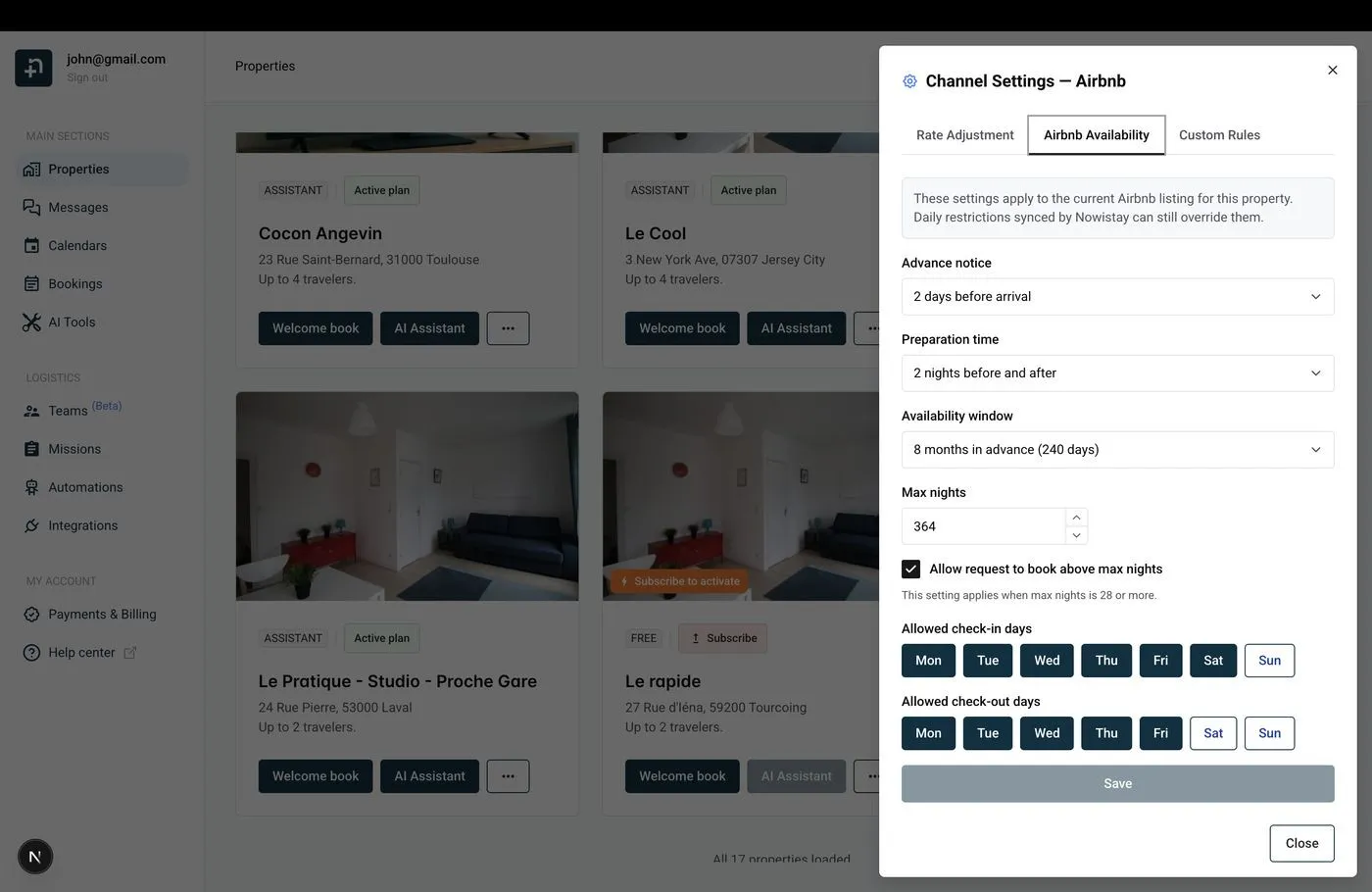
Guide: Airbnb availability settings.
Nowistay then helps you create your welcome guide, the digital guest handbook the AI co-host uses to answer questions. Let the AI generate it from your Airbnb listing and your PDF documents, copy a guide from another property, or start from scratch. Paste in what you used to send from Smoobu: arrival instructions, Wi-Fi, house rules, parking, local tips. Your AI co-host then answers guests on Airbnb, Booking.com, Expedia, WhatsApp and email, 24/7, from the first inquiry. Guide: Create your digital welcome guide with AI.
In Smoobu, your templates are under Experience > Communication > My message templates. There is no export: open each template and copy its text, trigger and timing into a document.
Nowistay sends each message in the guest’s language: add languages to a template and use Translate from default to translate it with AI.
Smoobu writes placeholders in square brackets, Nowistay uses double braces. For the check-in and check-out times, the number of nights and the booking reference, use {{check_in_time}}, {{check_out_time}}, {{number_of_nights}} and {{reservation_number}}.
[firstGuestName] → {{guest_first_name}}[guestName] → {{guest_full_name}}[adults] → {{guest_count}}[arrivalDate] → {{arrival_date}}[departureDate] → {{departure_date}}[apartment] → {{property_name}}[price] → {{booking_amount}}[guestPhone] → {{guest_phone_number}}[guestAppLink] → {{welcome_guide_url}}[nukiPin] or [igloohomeLockCode] or [tedeePin] → {{smartlock_code}}Nowistay also offers {{arrival_day_name}}, {{days_to_checkin}}, {{host_first_name}}, {{whatsapp_link}}, {{identity_check_link}} (guest identity verification) and {{deposit_payment_link}} (security deposit). Wi-Fi codes, parking details and other fixed property information belong in your welcome guide, or in property variables you can insert from the variable picker.
Example: to send a message at 10:00 two days before arrival with a 16:00 check-in, choose Check-in, Before the event, 54 hours.
Stop Smoobu’s messages so guests don’t receive everything twice. Smoobu has no master switch: set the trigger of each template to Manual sending only.
Guide: How to set up automated guest messages.
If you used PriceLabs with Smoobu, turn off Sync Prices for the Smoobu listings in PriceLabs (or remove them) before adding them again through Nowistay. If you used Smoobu’s own Dynamic Pricing, Smoobu asks you when you cancel whether to Keep the last dynamic prices or Restore your original prices; your channels now take their prices from Nowistay.
To connect PriceLabs to Nowistay: go to Integrations, open the Pricelabs card, click Configure then Generate Key and copy the key. In PriceLabs, click Add Your Listings, select Channex, paste the key and click Connect. A property appears once it is on Nowistay PMS with at least one connected channel. Your PriceLabs strategies keep working, only the connection changes. Guide: How to connect PriceLabs for dynamic pricing.
In Nowistay, go to Integrations > Smart locks and click Connect on your brand: Nuki, igloohome, Tedee, TTLock, Homeit, and the Premium connection for Schlage, Yale, August and KeyNest. Nowistay creates a code for each booking, valid from check-in to check-out, and sends it with the {{smartlock_code}} variable.
In Smoobu, locks are connected from Marketplace > Smart Home (Nuki, igloohome, Tedee, RemoteLock) or through Smart Devices. Disconnect them there so only Nowistay sends codes, and replace Smoobu placeholders such as [nukiPin] with {{smartlock_code}}.
Smoobu’s Booking Engine, Website Builder and Guest Guide are tied to your Smoobu account:
apartmentIframe) and any link to booking.smoobu.com.www CNAME to s.eu-multiscreensite.com and the A records 18.197.248.23 and 52.59.120.70).{{welcome_guide_url}}) instead of the Smoobu link.To take direct bookings with Nowistay: go to Integrations > Direct Booking > Configure, connect your Stripe account (Connect Stripe Account), click Create widget (Single property or Multiple properties), then copy the Embed code and paste it where the old widget was. In the widget settings, choose Full payment or Split payment, and add your taxes and discounts. The widget works on WordPress, Webflow, Wix, Squarespace or plain HTML. Guide: How to set up direct booking on your website.
Do this last, once Airbnb, Booking.com, Vrbo and Expedia all show as connected in Nowistay and your direct bookings are imported. Disconnecting channels does not stop Smoobu billing: you have to cancel.
The cancellation takes effect at the end of the period you paid for. Smoobu confirms it with a banner on the plan page, not by email. Open invoices remain due and removing properties mid-term is not refunded. Your account is then deactivated, not deleted: to delete it, ask Smoobu support.
